What is a Trigger in DBMS?

AfterAcademy Tech
•
04 Mar 2020
Have you ever signed up for any website using your Gmail? Well of course yes! Sometimes when you sign up, you automatically get a welcome mail on your Gmail like "Hey, thank-you for registering to XYZ". How does this happen? One possibility is that the triggers may have been used. Whenever a new user data is entered into the website's database the trigger automatically sends a welcome mail to the new user. I hope now you got the basic idea of triggers. But what exactly are these triggers? In this blog, we will be learning about Triggers in DBMS. So, let's get started.
Triggers
Triggers are the SQL statements that are automatically executed when there is any change in the database. The triggers are executed in response to certain events(INSERT, UPDATE or DELETE) in a particular table. These triggers help in maintaining the integrity of the data by changing the data of the database in a systematic fashion.
Syntax
create trigger Trigger_name
(before | after)
[insert | update | delete]
on [table_name]
[for each row]
[trigger_body]
- CREATE TRIGGER: These two keywords specify that a triggered block is going to be declared.
- TRIGGER_NAME: It creates or replaces an existing trigger with the Trigger_name. The trigger name should be unique.
- BEFORE | AFTER: It specifies when the trigger will be initiated i.e. before the ongoing event or after the ongoing event.
- INSERT | UPDATE | DELETE: These are the DML operations and we can use either of them in a given trigger.
- ON[TABLE_NAME]: It specifies the name of the table on which the trigger is going to be applied.
- FOR EACH ROW: Row-level trigger gets executed when any row value of any column changes.
- TRIGGER BODY: It consists of queries that need to be executed when the trigger is called.
Example
Suppose we have a table named Student containing the attributes Student_id, Name, Address, and Marks.
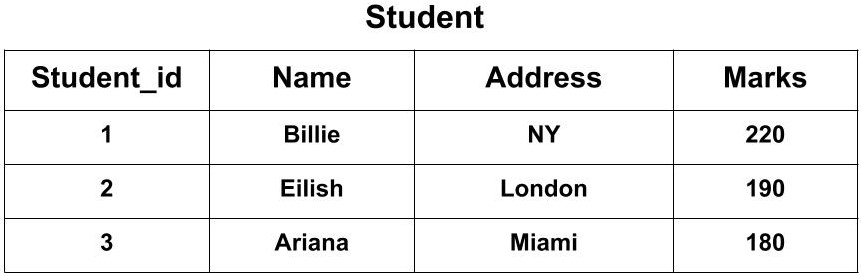
Now, we want to create a trigger that will add 100 marks to each new row of the Marks column whenever a new student is inserted to the table.
The SQL Trigger will be:
CREATE TRIGGER Add_marks
BEFORE
INSERT
ON Student
FOR EACH ROW
SET new.Marks = new.Marks + 100;
The new keyword refers to the row that is getting affected.
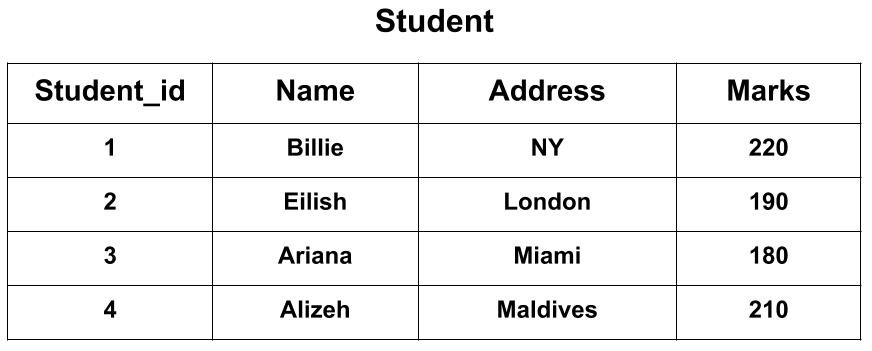
After creating the trigger, we will write the query for inserting a new student in the database.
INSERT INTO Student(Name, Address, Marks) VALUES('Alizeh', 'Maldives', 110);
The Student_id column is an auto-increment field and will be generated automatically when a new record is inserted into the table.
To see the final output the query would be:
SELECT * FROM Student;
Advantages of Triggers
- Triggers provide a way to check the integrity of the data. When there is a change in the database the triggers can adjust the entire database.
- Triggers help in keeking User Interface lightweight. Instead of putting the same function call all over the application you can put a trigger and it will be executed.
Disadvantages of Triggers
- Triggers may be difficult to troubleshoot as they execute automatically in the database. If there is some error then it is hard to find the logic of trigger because they are fired before or after updates/inserts happen.
- The triggers may increase the overhead of the database as they are executed every time any field is updated.
This was about Triggers in SQL. If you have come this far, it means you liked what you are reading. Hope you learned something new today.
Do share this blog with your friends to spread the knowledge. Visit our YouTube channel for more content. You can read more blogs from here.
Keep Learning 🙂
Team AfterAcademy!
Written by AfterAcademy Tech
Share this article and spread the knowledge
Read Similar Articles
AfterAcademy Tech
Difference between Trigger and Stored procedure in DBMS
In this blog, we will learn how triggers are different from stored procedures.
AfterAcademy Tech
What is Cross-Join in DBMS?
In this blog, we will learn how to cross-join two tables in DBMS, and what are the benefits of doing it with example.
AfterAcademy Tech
What is a Stored Procedure in DBMS?
In this blog, we will learn what is a stored procedure in DBMS, and how it is executed depending on the number of parameters passed.
AfterAcademy Tech
What is the difference between DBMS and RDBMS?
In this blog, we will learn what is RDBMS and how it is different from DBMS. People often use these words intechangeably. But there is a difference between these two terms. So, let's learn how.