What is a Stored Procedure in DBMS?

AfterAcademy Tech
•
21 Mar 2020
In the last blog, we have learned about triggers. Stored Procedures are similar to the triggers and they also perform a specific task but the difference is in the execution process. In this blog, we will learn about the Stored Procedure in DBMS. So, let's get started.
Stored Procedure
A stored procedure in SQL is a type of pre-written code that can be stored for later execution and then used many times hence, saving time. It is a group of SQL statements that performs the task. The stored procedure can be invoked explicitly whenever required. It may accept some inputs in the form of parameters, these may be one parameter or multiple parameters.
Syntax:
CREATE PROCEDURE stored_procedure_name
AS
sql_statement
GO;
Execute A Stored Procedure
The store procedure that is created by the above SQL statements can be executed by using the following statement.
EXEC stored_procedure_name;
Example:
We have a table named Customer_details with attributes as Customer_id, Name, Address, Age.
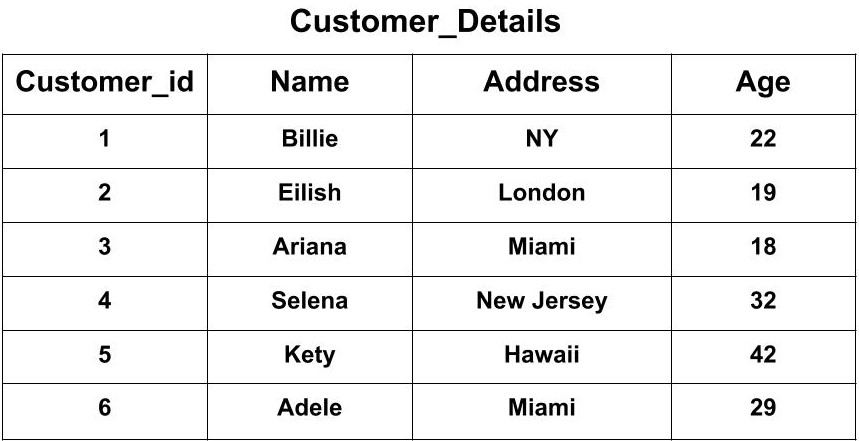
Now, we want to create a Stored Procedure called CustomerList that selects all the Customers from the Customer_Details Table.
CREATE PROCEDURE CustomerList
AS
SELECT * FROM Customer_Details
GO;
The above-stored procedure can be executed by the following statement:
EXEC CustomerList;
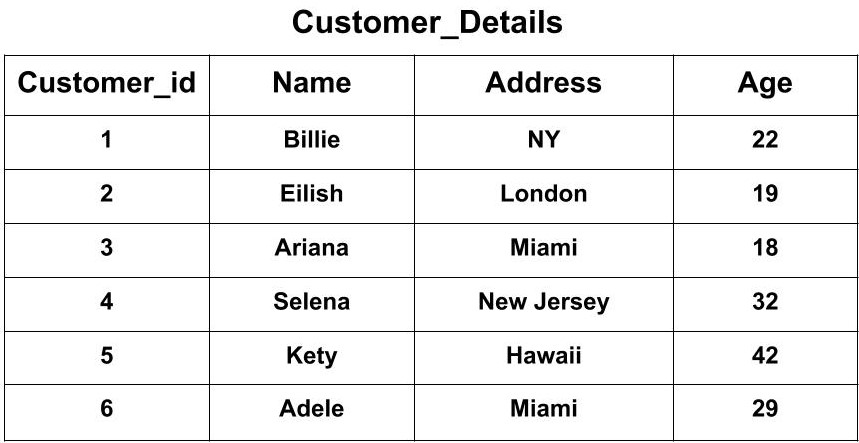
The output when the above command will be executed is the same input table:
The stored procedure can also be executed by passing parameters i.e.
- by passing one parameter.
- by passing multiple parameters.
Passing one parameter
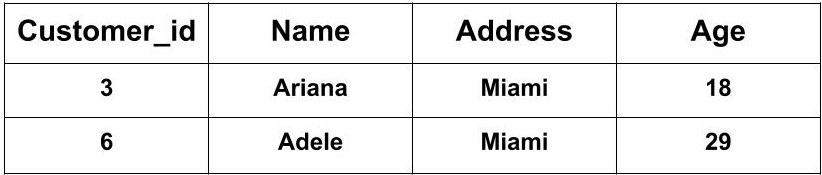
In the above Customer_Details table, we want to create a Stored Procedure called CustomerList that selects all the Customers from the Customer_Details who live in Miami.
CREATE PROCEDURE CustomerList @Address nvarchar(30)
AS
SELECT * FROM Customer_Details WHERE Address = @Address
GO;
The above-stored procedure can be executed by the following statement:
EXEC CustomerList @Address = "Miami";
The output when the above command will be executed is the same input table:
Passing multiple parameters
In the above Customer_Details table, we want to create a Stored Procedure called CustomerList that selects all the Customers from the Customer_Details table who live in Miami and their age is equal to 18.
CREATE PROCEDURE CustomerList @Address nvarchar(30), @Age nvarchar(10)
AS
SELECT * FROM Customer_Details WHERE Address = @Address AND Age = @Age
GO;
The above-stored procedure can be executed by the following statement:
EXEC CustomerList @Address = "Miami", @Age = "18";
The output when the above command will be executed is the same input table:

This was about the Stored Procedure in DBMS. If you have come this far, it means you liked what you are reading. Hope you learned something new today.
Do share this blog with your friends to spread the knowledge. Visit our YouTube channel for more content. You can read more blogs from here.
Keep Learning 🙂
Team AfterAcademy!
Written by AfterAcademy Tech
Share this article and spread the knowledge
Read Similar Articles
AfterAcademy Tech
Difference between Trigger and Stored procedure in DBMS
In this blog, we will learn how triggers are different from stored procedures.
AfterAcademy Tech
What is Cross-Join in DBMS?
In this blog, we will learn how to cross-join two tables in DBMS, and what are the benefits of doing it with example.

AfterAcademy Tech
What is the difference between DBMS and RDBMS?
In this blog, we will learn what is RDBMS and how it is different from DBMS. People often use these words intechangeably. But there is a difference between these two terms. So, let's learn how.
AfterAcademy Tech
What is Join in DBMS and what are its types?
In this blog, we will learn how to join two tables in DBMS. We will also learn about the various types of joins, mainly the inner and the outer join.