Create React Isomorphic App like a Pro

AfterAcademy Tech
•
28 Apr 2020

Developing a modern web app is challenging, mostly because of the choice paralysis. It hit me too when I started with web development a few years back. I had a gigantic sea of viable candidates for each aspect of the application and each had significant community support. Somehow I settled for the React.js and it turned out that React is just a view layer and I had to assemble other components like build system, routing, serving pages, etc.
I must admit that it was a frustrating experience. But this turmoil gave me an insight into each aspect of my application. Since then I have developed more than 10 websites using React stack and today I am happy to share my experiences in this blog. So, I welcome you to read ahead and add my experience to yours.
Today the modern web development is dominated by mainly 3 frameworks, React, Angular, and Vue. At the time of writing this blog, React covers about 79% of the job openings, 20% for Angular, and about 1% for Vue. [Reference Indeed.com]. You can also measure the community support from their GitHub stars. So, in short, React is one of the highly preferred solutions in the industry.
The react development has been simplified recently with Facebook's create-react-app. This is a really great way to start learning React because of the abstractions provided by it. It hides the underlying complexities of the build configuration, serving with hot replacement, etc., and we can just focus on the view layer. But what I believe is, after learning the view layer we have to learn the build system, routing, caching, and other caveats of the web systems. So, we have to eject from the create react app after some time.
Now, there is also a very very important aspect of any website i.e. to reach more audiences. So, if we are not Facebook then we have to rely on 2 mediums, Google Search and Social media sharing. So, we need the following two things:
- SEO friendly: Each HTML page should contain related metadata. The most important thing here is to help the crawler in consuming our content. React app relies on data from APIs. So, this is where create-react-app is not a good production choice, as it does not support SSR (server-side-rendering). Yes, for static pages pre-rendering (generate each page at build time can help but React apps are chosen for dynamic websites).
- Social Media Share: Each HTML page should have OG metadata so that when the link is shared on Facebook, LinkedIn, Twitter, etc, it can generate beautiful cards and thus can attract audiences. Also, this has to be specific to each page and should be generated dynamically.
To sum up, at the and of the day we will have to dive deeper into the React app to utilize its true potentials.
To, help the community, we here at AfterAcademy have open-source a complete React app with production level design. In this blog, I will discuss various aspects of this project.
Project Details
This is the GitHub repository of the Project: https://github.com/afteracademy/react-app-architecture
This project has a complete implementation of a blogging framework. You can find the demo project website running here: https://demo.react-app-architecture.afteracademy.com
The main features of the project:
- Type Safety
- Isomorphic Javascript: SSR and Client Rendering
- Feature Encapsulation
- Hooks APIs
- Hot Module Replacement
- Reduced Boilerplate
- Optimized Production Builds
Now, let's discuss each features one by one:
Type Safety
You can trust me on this, it's better to find bugs during the build phase rather than the runtime. Strong types do help to achieve this. It may seem counterproductive for your first few lines of code but then you will find increased productivity with intellisense in vscode.
There are two major options for strong typing, Typescript, and Flow. I started with Flow as it seems inherent with React library, but it did not feel natural, and also vscode has very poor support for it. Many libraries do not have types defined for Flow. I found it counterproductive. I have a branch [flow-setup] in the project repository, try it out if you like.
Then I adopted the Typescript for this project, and it was way more productive for me. It has better community support for types and it is just flawless with vscode. The current project thus use Typescript codebase and compile it via Babel.
Let's see how Typescript helps us:
type Author = {
  _id: string;
  name: string;
  profilePicUrl: string;
};

function AuthorView({ author, date }: { author: Author; date?: string }) {
  const classes = useStyles();
  return (
    <div className={classes.author}>
      {author.profilePicUrl ? (
        <CardHeader
          avatar={<Avatar aria-label={author.name} src={author.profilePicUrl} />}
          title={author.name}
          subheader={date ? convertToReadableDate(date) : ''}
        />
      )}
    </div>
  );
}
Here, if we pass anything other than the object having the exact structure defined by the type Author then we will get an error, and vscode will show it.
Isomorphic Javascript
This is the best of both worlds, Server-Side-Rendering (SSR) and Client-Side-Rendering (CSR). The two requirements that I mentioned earlier, SEO (Crawling) and Social Share, both are solved with SSR. The client app also remains superfluid with CSR. To achieve this, our project has a server module with simple functionalities.
Note: The API server is separate and is also opensource by us -https://github.com/afteracademy/nodejs-backend-architecture-typescript
Our project uses renderToString with the Redux Store to generate the HTML page dynamically by calling the API server for component's data. You can find this code in the repository src/server/pageBuilder.tsx
The template HTML file for injecting these dynamic data can be found in the project at public/template.html
So, when a client or crawler asks for any page, for example, a blog page, then the server internally calls the API server for the latest blog data, and then it renders the HTML with the response data while also setting the metadata. Finally, it sends that page back to the client. This makes it SEO friendly and also a faster first paint for the client.
In case the client goes to this blog page though internal routing, i.e. in-app running in his/her browser then the client app only renders the data of the blog by fetching it from the API server. It saves the full page fetch and thus makes it super fast.
Feature Encapsulation
Each feature in this project has been developed with all the related components grouped together. It makes it easier to move code around and also write tests. The project uses Redux for the data layer, and thus borrows the action and reducer concept in the architecture.
I prefer Redux over the Context APIs as it is simpler, convenient, and very effective in SSR.
The components are present in the src/ui directory. There two types of component:
- Simple Component: It does not require a Redux state and is mainly static data. Example footer, header, notfound, etc.
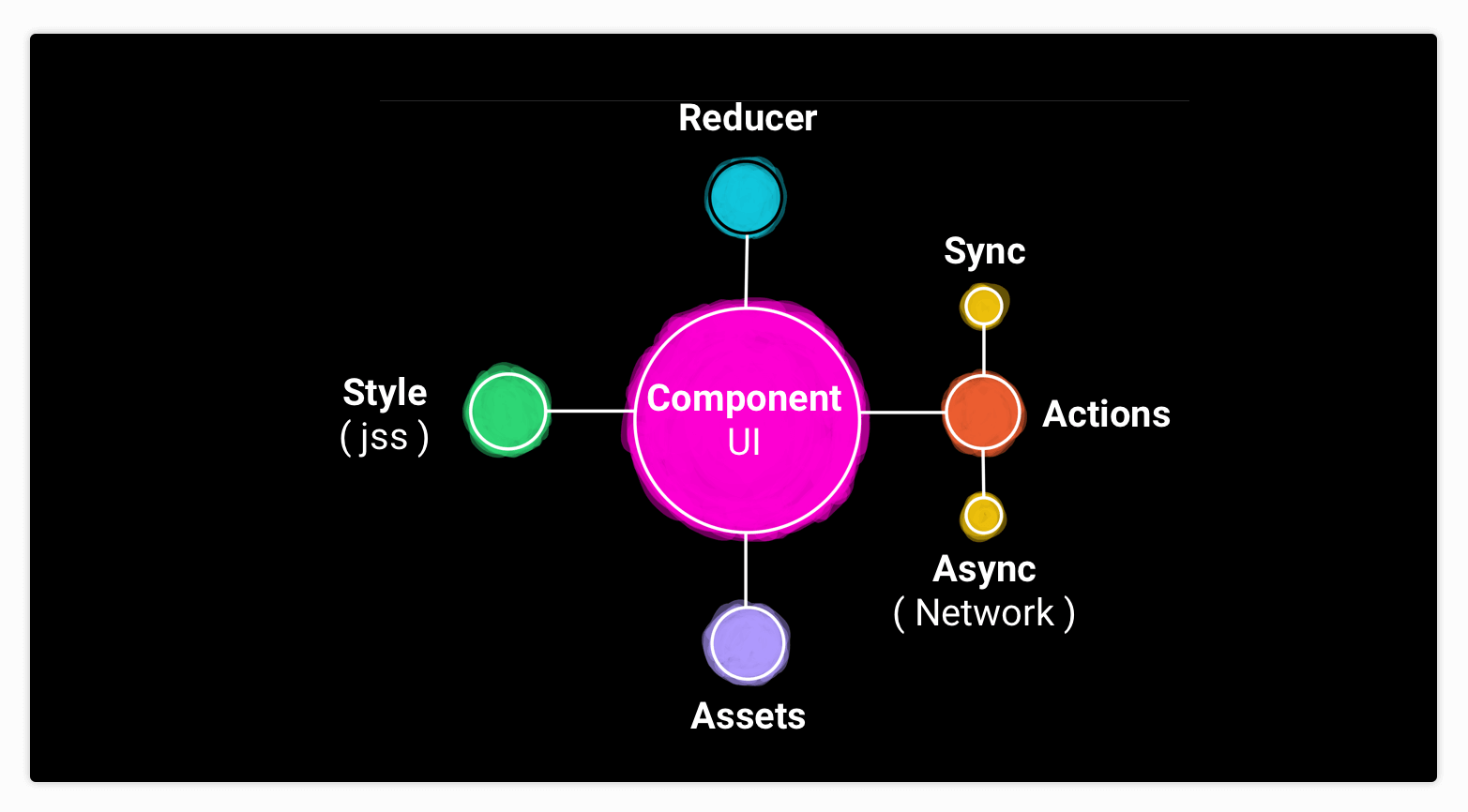
- UI components: It does require a Redux state and actions for side-effects. The architecture of this component is shown in the following figure:
Hooks APIs
This project is purely written with functions and uses React hooks, Redux hooks, and hooks from other libraries. It saves us from prop drilling and also keeps the dom structure shallow. Example code:
import React, { ReactElement, useEffect } from 'react';
import useStyles from './style';
import { useDispatch } from 'react-redux';
import { useStateSelector } from '@core/reducers';
import { useRouteMatch } from 'react-router-dom';
...

export default function BlogPage(): ReactElement {
  const classes = useStyles();
  const match = useRouteMatch<{ endpoint: string }>();
  const { data, isFetching, message } = useStateSelector((state) => state.blogState);
  const dispatch = useDispatch();

  useEffect(() => {
    ...
  }, [match.params.endpoint]);

  return (
    <div className={classes.root}>
     ...
    </div>
  );
}
Hot Module Replacement
The app runs in two modes development and production. The development server run-in a hot state, meaning that the realtime changes in the component code will be updated in the browser automatically. This is a very important feature for faster development. You can find it at src/server/server.dev.ts
Reduced Boilerplate
We can reduce a lot of boilerplate by creating utility classes. I have done the same in this project.
The Redux, for example, needs action and payload. For each network request, we would need three actions: Requesting, Success, and Failure. To simplify this I have written src/utility/creator.ts, to reduce the boilerplate.
Normally used Redux pattern: Before
export const FETCHING_PAGE_BLOG_REQUEST = 'FETCHING_PAGE_BLOG_REQUEST'
export const FETCH_PAGE_BLOG_SUCCESS = 'FETCH_PAGE_BLOG_SUCCESS'
export const FETCH_PAGE_BLOG_FAILURE = 'FETCH_PAGE_BLOG_FAILURE'

export const fetchingPageBlogRequest = () => ({
   type: FETCHING_PAGE_BLOG_REQUEST
})

export const fetchPageBlogSuccess = (data) => ({
   type: FETCH_PAGE_BLOG_SUCCESS,
   data: data,
})

export const fetchPageBlogFailure = () => ({
   type: FETCH_PAGE_BLOG_FAILURE
})

export const fetchPageBlogRequest = (blogId) => {
   return (dispatch) => {
      dispatch(fetchingPageBlogRequest())
      return ApiBuilder.public()
         .endpoint('blog/id/' + blogId)
         .method('GET')
         .build()
         .call(dispatch)
         .then(response => {
            if (response.data && response.data.text)
               response.data.text = addBannerInBlogText(response.data.text)
            dispatch(fetchPageBlogSuccess(response.data))
         })
         .catch(err => dispatch(fetchPageBlogFailure()))
   }
}
Using action creator in our project: After
import { networkActionsCreator } from '@utils/creator';
export const blogActions = networkActionsCreator<Blog>('BLOG_PAGE');

export const fetchBlogByEndpoint = (endpoint: string): AsyncAction => async (
  dispatch: Dispatch,
) => {
  try {
    dispatch(blogActions.requesting.action());
    const response = await publicRequest<null, Blog>({
      url: 'blog/url',
      method: 'GET',
      params: {
        endpoint: endpoint,
      },
    });
    dispatch(blogActions.success.action(response));
  } catch (e) {
    dispatch(blogActions.failure.action(e));
  }
};
Similarly, I have also created src/utils/network to enforce the centralized request and response handling.
There is a very interesting function I have written for importing assets in the project. src/utils/importer.ts and a corresponding webpack loader at tools/importer-loader.js. This is effective in SSR, CSR, and Webpack bundling.
import importer from '@utils/importer';

const AboutUs = () => {
  const afteracademyLogo = importer('@ui/header/assets/afteracademy-logo.svg');
  const mindorksLogo = importer('./assets/mindorks-logo.svg');
  ...
  return (
   <div>
     <InfoCard
       imgUrl={afteracademyLogo}
       ...
     />
     <InfoCard
       imgUrl={mindorksLogo}
       ...
     />
  );
};
In the webpack this loader needs to be applied:
module.exports = {
  ...
  module: {
    rules: [
      {
        test: /\.(ts|js)x?$/,
        exclude: [/node_modules/],
        use: [
          { loader: 'babel-loader' },
          {
            loader: path.resolve('./tools/importer-loader.js'),
            options: {
              functionName: 'importer',
            },
          },
        ],
      },
      ...
    ]
    ...
}
To reduce the path resolution in the project, I have provided the short resolution versions.
- @ui → Refer files inside the src/ui → @ui/app/reducer
- @core → Refer files inside src/theme → @core/theme
- @utils → Refer files in src/utils → @util/network
Optimized Production Build
The webpack has been configured to generate client code by applying minification, tree shaking for Material-UI, small size chunks. The development server runs using Babel-Register but the production server builds the code in the build directory. The client code post bundle lies in the dist directory.
That's it for this blog. I hope you must have enjoyed reading it as much as I enjoyed writing it.
GitHub Repository Link: https://github.com/afteracademy/react-app-architecture
Let me know your feedback in the comments below and also mention other topics you would want me to write.
Please, share this blog so that others can learn from it.
Take Care and Keep Learning
Written by AfterAcademy Tech
Share this article and spread the knowledge
Read Similar Articles

Janishar Ali
Design NodeJs Backend Architecture like a Pro
Node.js backend architecture in Typescript. Learn the concepts behind building a highly maintainable and performant backend server application in ExpressJs. Implement a blog platform - role based APIs using JWT. ExpressJs, Mongodb, Redis, Joi, and Jest

Janishar Ali
How to Create Microservices — A Practical Guide Using Go
gomicro is a Go microservices architecture using goserve micro framework. The blogging platform example is built using Kong API gateway, NATS, Mongo, Redis, and Docker. It implements authentication, authorization, and apikey protection.

Janishar Ali
Android MVVM Architecture for A Production Ready App
Android development has gone through a rapid change over the past couple of years. Key milestones include Kotlin, Architectural Components, Coroutines, Compose, AndroidX, Navigation, and DataStore. This article discusses the latest version of the MMVM architecture.

AfterAcademy Tech
Greatest Common Divisor-Interview Problem
This is a mathematical problem asked in interviews of Google like companies. For solving such problems you need to have some math skills and also some idea of algorithms like Euclid's GCD algorithm.