What is a Database and DBMS?

AfterAcademy Tech
•
04 Dec 2019
Today we deal with a large amount of data. Almost every website and mobile application are generating lots of data every day and these data need to be handled. This can't be handled with simple software or tool. We need to store all these data and then manage the data with some dedicated system. Here comes the role of Database and DBMS.
You all must be familiar with the term Database and DBMS. So, is there any difference between these two terms or they are almost the same term?? No, they are not the same term. In this blog, we will be learning about the term Database and DBMS. So, let's get started.
Database
The database sometimes referred to as an electronic database, is an organized collection of logically related data that is stored in an efficient manner so that it can be easily accessed managed and updated. Let's divide the whole definition into parts and understand in an easier way:
Organized Collection
Data should be arranged in such a way that the user can easily process the data when required. Example: If we have some details about Computer specifications, then we can represent the specification in two ways:
Unorganized Data: Lenovo35000i58, HP55000i34. The computer specifications are provided here like its brand name, price generation and RAM but they are unorganized and it is not easy to process them. Here, you can't identify the difference between the generation of the computer i.e i5 and its RAM i.e. 8GB. So, we have to organize the data.
Organized Data: Lenovo/35000/i5/8, HP/55000/i3/4. Here, we have made a separation between each specification so that it can be easily distinguished and processed. Here, we can see that the generation and RAM of the system are separated by "/" and this helps us in distinguishing between the two features.
Logically Related Data
Logically related data means that the data should be relevant in some context. Example: If we are going to make a database for a customer then the database may include customer name, contact number, age, past orders, address, email id, etc. All these information are in the context of the customer. But the information like the number of siblings of the customer is out of context and logically not related to the customer database, though this information is related to the customer, we shouldn't include this data in our database.
DBMS - DataBase Management System
The software which is used to manage the database is called Database Management System(DBMS). It provides us with an interface or a tool, to perform various operations like:
- creating the database
- manipulating the database
- storing and retrieving the data from the database
- deleting data from the database, etc
The changes in the database have to be made according to certain rules and these rules are defined in DBMS itself. A DBMS can limit what data the end-user sees and provides multiple views of the same database depending upon the user accessibility. For example, you can provide access to write on the database to some particular users only and for other users, you can provide the read access. The best part is that all you need to do is just use some DBMS software and you are good to go. Some popular DBMS software is MySQL, Oracle, SQLite, PostgreSQL, MariaDB etc.
Example
Let's now understand the concept of Database and DBMS with the help of an example of a company's database. For this example, we will see how data is stored in Relational DBMS(a type of DBMS) using tables. This database maintains information about employee, department, projects.
The database is organised in the following three files:
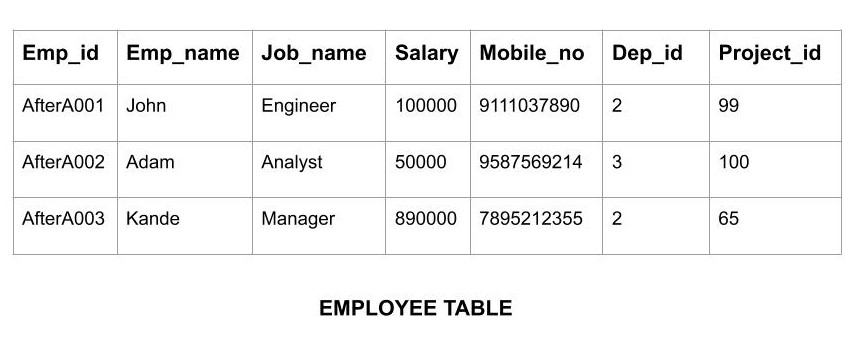
- EMPLOYEE file stores the data of each employee like employee id, employee name, mobile, job-name, salary etc in the form of a table. We can represent this using various models which is available to represent DBMS. This is an example of relational DBMS where we store data in the form of a table and each table is called a relation. Here each row is called a record which represents a particular instance of object and columns are a set of facts which help in describing the object.
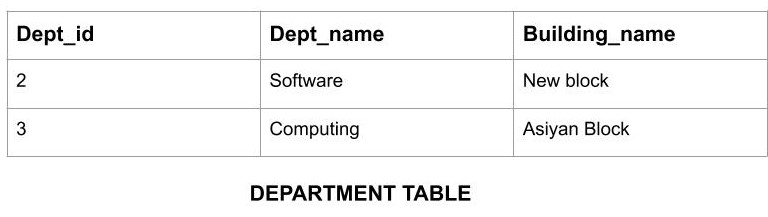
- DEPARTMENT file stores the data of each department of the company like department name, buildings name, etc.
- PROJECT file stores the information about the projects that are being undertaken in the company.
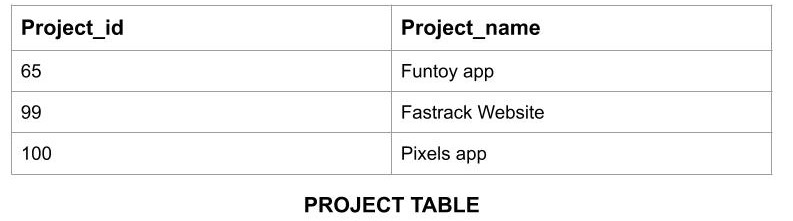
Now for defining the database system:
- We will define the datatype of each record in the file. Example: While storing the records of employee information we need to specify that the employee id should only contain a particular sequence like AfterA001, etc.
- All the above three tables will be interrelated to each other using foreign keys(a key which is used to link two tables) defined in each table.
Characteristics of DBMS
- Real-World Entity: A DBMS uses real-world entities(object) to design its architecture. Example: A customer database uses customers as an entity and the phone number of the customer as an attribute.
- Relation-based Tables: Using DBMS we can form tables based on relations between various entities. Example: In a university database, we can have students and college as entities. So we have a relationship between student and college that a student studies in a college. Based on this relationship between these two entities we can form two tables. One table will be of entity 'student' which will have columns like student_name, student_class, etc. and the other table will be of entity 'college' which have columns like college_id, college_city, etc.
- Query Language: DBMS comes equipped with query language which allows the users to store and retrieve the data. We can apply as many filtering options as required and get specific results.
- Multiple Views: It provides multiple views of the same data depending upon the user. Example: In a university database, the accountant will have a different view of data than a student. The accountant may have access to the salary of teachers but students won't have that access.
- Multiple Users: DBMS allows multiple users can access the data at the same time and work upon it parallelly.
- ACID Properties: The transaction(a group of tasks) in DBMS follows the concept of ACID(Atomicity, Consistency, Isolation, Durability). Atomicity means either the transaction will happen or it will not happen. Consistency means the state of the database will be consistent before and after the transaction. In Isolation, one transaction will not affect the working of others. Durability means the database should be durable and should not be affected by some system failures or any other errors.
Users in a DBMS
DBMS provides an interface for many users to access and retrieve the data. This access type depends upon the software capabilities of the user. So, the users in a DBMS can be classified into the following three types on the basis of their software capabilities and expertise:
- Application Programmers: They make software programs for managing the database.
- Database Administrator: He/She is responsible for managing the entire database system and are called database admin(DBA).
- End-Users: They are the people who use DBMS software and perform various operations like retrieving, deleting, inserting etc.
Advantages of DBMS
- Data Abstraction: It shows only those data to the user which are useful for them and hides the complexity of data from the end-users.
- Control data Redundancy: It controls the database from forming multiple copies of the same data.
- Minimized Data Inconsistency: The DBMS keeps a check that if the value of an object is present in two different files then both these values should be the same.
- Easy Data Manipulation: In DBMS the data is centralized so we can easily modify the data at one place and the change would be reflected at all other places where the data is present.
- Concurrent Access: Multiple users can access the data at the same time.
- Backup and Recovery: We can make copies of our data and data can also be recovered during system failure by applying some recovery techniques.
Disadvantages of DBMS
- Increased Cost: The cost of maintaining software, hardware, and personnel to operate and maintain the DBMS can be very high. Also, training and licensing costs add up when a full database system is implemented. These extra costs are not considered in starting.
- Increased Complexity: Since most of these Database Management Systems use many different technologies at the same time they require training for users to use this. Only specialized personnel can operate it. It requires a lot of management skills.
- Frequent Update: As new technologies are coming in the market every day we need to remain updated. The DBMS vendors keep on adding new functionality to upgrade their products. So not only these upgrades cost to the company but also training the database users and DBA to learn new changes costs to the company.
- Higher Impact Of Failure: The database in DBMS is centralized which increases the vulnerability of the system. So the failure of any component or corruption of any storage device can bring the system to a halt.
That's it for this blog. Hope you learned something new today.
Do share this blog with your friends to spread the knowledge. Visit our YouTube channel for more content. You can read more blogs from here.
Keep Learning 🙂
Team AfterAcademy!
Written by AfterAcademy Tech
Share this article and spread the knowledge
Read Similar Articles
AfterAcademy Tech
What is a Database Management System and how is it different from a File System?
In this blog, we will learn what is DBMS and a traditional file system. We will also dive deep and understand the problems of the file system and get to know how DBMS resolved these problems.
AfterAcademy Tech
What is a Query and Subquery in DBMS?
In this blog, we will learn about Queries and SubQueries that are used to perform operations on some database.

AfterAcademy Tech
What is Cross-Join in DBMS?
In this blog, we will learn how to cross-join two tables in DBMS, and what are the benefits of doing it with example.
AfterAcademy Tech
What is a Stored Procedure in DBMS?
In this blog, we will learn what is a stored procedure in DBMS, and how it is executed depending on the number of parameters passed.