What are the classes of IPV4? How to identify IP class from a given IP address?

AfterAcademy Tech
•
29 Feb 2020
IP addressing is the most popular way to identify a device on the network. The address has 32 bits which can be broken into four octets(1 octet=8 bit). These octets provide an addressing method through which we can accommodate large and small networks. Accordingly, there are 5 classes of the network about which we will study in this blog. So, let's get started.
IPv4
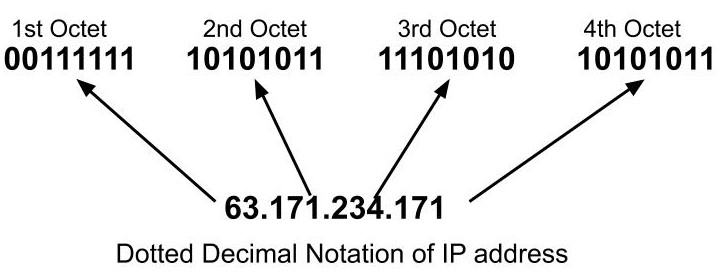
IP version 4 is 32 bits long. The maximum value of a number that can be formed by using 32 bits is 2³². So, the maximum number of IPv4 addresses is 4,294,967,296 addresses i.e. 2³² addresses. It consists of four octets each of which can contain one to three digits ranging from 0 to 255 separated by a single dot(.). Here, each number is the decimal representation(base-10) for an 8 digit binary number(base-2).
Example of an IPv4 address: 63.171.234.171
Classes of IPv4
- Class A
- Class B
- Class C
- Class D
- Class E
The order of the bits in the first octet of the IP address decides the class of the IP address.
Some bits of the IP address represents the network and the remaining bits represent the host. The IP address can be further be divided into two parts:
Network ID: It identifies which network you are on. The number of networks in any class is given by the formula:
Number of Networks= 2^networkBits
Host ID: It identifies your machine on the network. The number of hosts in any class is given by the formula:
Number of Hosts= 2^hostBits-2.
Here, 2 IP addresses are subtracted because
- Host ID in which all the bits are set to 0 is not assigned because this represents the network ID.
- Host ID in which are the bits are set to 1 is reserved for Direct Broadcast Address(for sending the data from one network to all the other hosts in another network).
Class A
The IP address belonging to Class A uses only the first octet to identify the network and the last three octets are used to identify the host.
- The Network ID has 8 bits.
- The Host ID has 24 bits.
The first bit of the first octet is always set to 0.

The default subnet mask for Class A IP address is 255.0.0.0. Subnet masks are used to tell hosts on the network which part is the network address and which part is the host address of an IP address.
How does the subnet mask do this?
Suppose you have an IP address as
10.20.15.3 = 00001010.00010100.00001111.00000011
and the mask as,
255.0.0.0 = 11111111.00000000.00000000.00000000
The IP address bits that have corresponding mask bits as 1 represents the network ID and the address bits that have corresponding mask bits as set to 0 represent the host ID.
10.20.15.1 = 00001010.00010100.00001111.00000001
255.0.0.0 = 11111111.00000000.00000000.00000000
by comparing corresponding bits of address bits and mask bits we get,
netid = 00001010 = 10
hostid = 00010100.00001111.00000011 = 20.15.3
Class A has:
- Network ID =2⁷-2 = 126 (Here 2 address is subtracted because 0.0.0.0 and 127.x.x.x are special address. 127.x.x.x is reserved for localhost )
- Host ID = 2²⁴-2 = 16,777,214
The IP address belonging to Class A range from 1.a.a.a to 126.a.a.a.(where a ranges from 0 to 255)
Class B
The IP address belonging to Class B uses the first two octets to identify the network and the last two octets are used to identify the host.
- The Network ID has 14 bits.
- The Host ID has 16 bits.
The first two bit of the first octet is always set to 10.
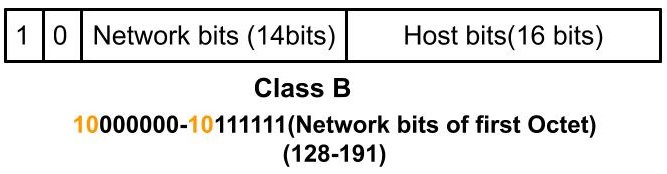
The subnet mask for class B is 255.255.0.0.
So, class B has:
- Network IDs = 2¹⁴ = 16384 network ID
- Host IDs = 2¹⁶ = 65534 host address
The IP address belonging to Class B range from 128.0.a.a to 191.255.a.a.(where a ranges from 0 to 255)
Class C
The IP address belonging to Class C uses the first three octets to identify the network and the last octet is used to identify the host.
- The Network ID has 21 bits.
- The Host ID has 8 bits.
The first two bit of the first octet is always set to 110.
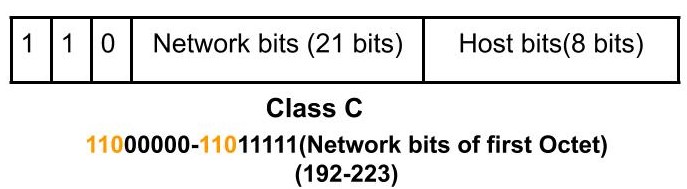
The subnet mask for class B is 255.255.255.0.
So, class C has:
- Network IDs = 2²¹= 2097152
- Host IDs = 2⁸= 254
The IP address belonging to Class C range from 192.0.0.a to 223.255.255.a.(where a ranges from 0 to 255)
Class D
The IP address belonging to Class D has the first four bits of the first octet set as 1110. The remaining bits are the host bits.
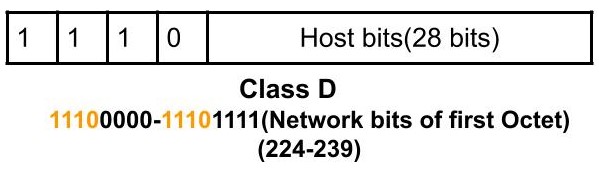
The IP address belonging to Class D range from 224.0.0.0 to 239.255.255.255.
Class D is reserved for multicasting. Also, this class doesn't have any subnet mask.
Class E
The IP address belonging to Class E has the first four bits of the first octet set as 1111. The remaining bits are the host bits.

The IP address belonging to Class D range from 240.0.0.0 to 255.255.255.254.
This class is reserved for future use, research and development purposes. It also doesn't have any subnet mask.
How to identify the IP class from a given IP address?
So, using the above knowledge given an IP address you can identify the class of the IP address.
You can do it by looking at the first octet of the IP address. Convert the dotted-decimal IP address to its binary equivalent.
- If it begins with 0, then it’s a Class A network.
- If it begins with 10, then it’s a Class B network.
- If it begins with 110, then it’s a Class C network.
- If it begins with 1110, then it’s a Class D network.
- If it begins with 1111, then it’s a Class E network.
Alternatively, you can learn the range of IP addresses of each class.
That’s it for this blog. Hope you learned something new today.
Do share this blog with your friends to spread the knowledge. Visit our YouTube channel for more content. You can read more blogs from here.
Keep Learning 🙂
Team AfterAcademy!
Written by AfterAcademy Tech
Share this article and spread the knowledge
Read Similar Articles
AfterAcademy Tech
What is an IP address?
In this blog, we will learn what is an Ip address and what are the various versions of IP addresses being used. We will also discuss what are the types of IP addresses depending upon how they are assigned to any system.
AfterAcademy Tech
What is the difference between MAC address and IP address?
In this blog, we will first learn about the MAC and IP addresses in brief. And then, we'll see the dissimilarities between the two.
AfterAcademy Tech
Difference between IPv4 and IPv6
In this blog, we will discuss IPv4 and IPv6 versions of IP address. We will also discuss in details about their packet formats and finally see the differences among them.

AfterAcademy Tech
What is the TCP/IP model and how it works?
In this blog, we will mainly learn about the TCP/IP model and its working in detail. We'll focus on the features and working of each layer of the TCP/IP model.