What are Routers, Hubs, Switches, Bridges?

AfterAcademy Tech
•
22 Jan 2020
Routers, Hubs, Switches, and Bridges are all network connecting devices. A network connecting device is a device that connects two or more devices together that are present in the same or different networks.
A network connecting device can be a repeater, hub, bridge, switch, router, or gateway. But in this blog, we'll focus on hubs, switches, routers, and gateways. We'll also learn about their features, advantages, and disadvantages in networking.
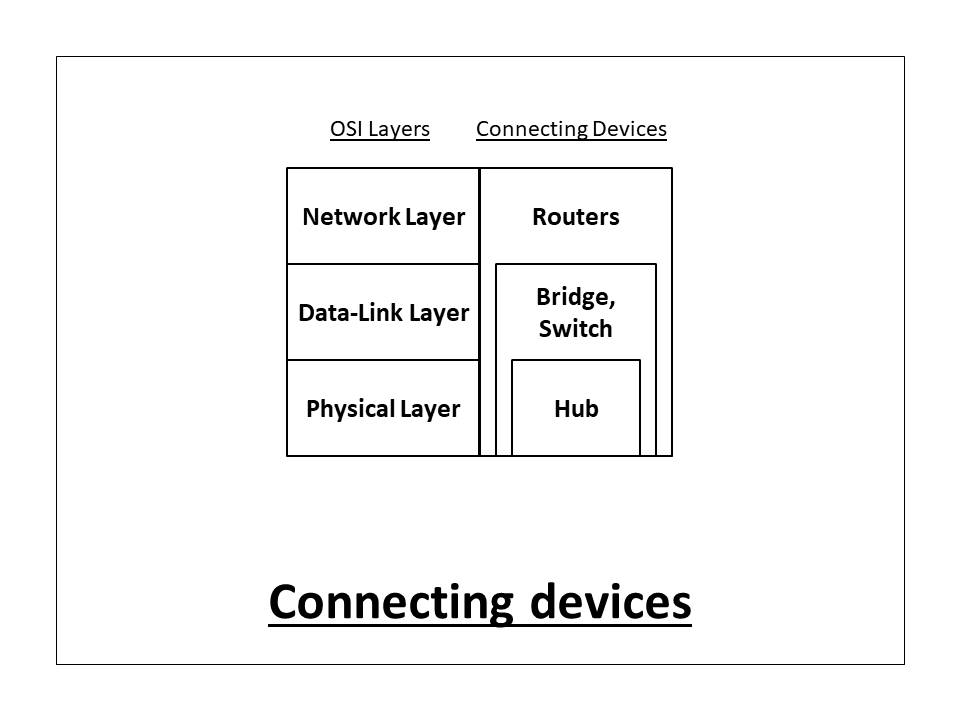
All these connecting devices operate in some specific layers of the OSI(Open System Interconnection) Model. These specifications are provided in the diagram below.
Now let us learn about these network connecting devices one-by-one.
1. Hub
Hub is a very simple network connecting device. In Star/hierarchical topology, a Repeater is called Hub. It is also known as a Multiport Repeater Device.
A Hub is a layer-1 device and operates only in the physical network of the OSI Model. Since it works in the physical layer, it mainly deals with the data in the form of bits or electrical signals. A Hub is mainly used to create a network and connect devices on the same network only.
A Hub is not an intelligent device, it forwards the incoming messages to other devices without checking for any errors or processing it. It does not maintain any address table for connected devices. It only knows that a device is connected to one of its ports.
When a data packet arrives at one of the ports of a Hub, it simply copies the data to every port. In other words, a hub broadcasts the incoming data packets in the network. Due to this, there are various security issues in the hub. Broadcasting also leads to unnecessary data traffic on the channel.
A Hub uses a half-duplex mode of communication. It shares the bandwidth of its channel with the connecting devices. It has only one collision domain, so there are more chances of collision and traffic on the channel. A hub is connected in limited network size. If the network size is increased, the speed of the network will slow down. Also, a hub can only connect the devices in the same network with the same data rates and format only.
There are mainly two types of Hub, they are:
- Active Hub: An Active hub is also known as Concentrator. It requires a power supply and can work as a repeater. Thus, it can analyze the data packets and can amplify the transmission signals, if needed.
- Passive Hub: A passive hub does not need any power supply to operate. It only provides communication between the networking devices and does not amplify the transmission signals. In other words, it just forwards the data as it is.
Following are the advantages of using a Hub:
- It is simple to implement.
- The implementation cost is low.
- It does not require any special system administration configuration. We can just plug and play it.
Following are the disadvantages of using a Hub:
- It can connect devices of the same network only.
- It uses a half-duplex mode of communication.
- It is less secure, as it broadcasts the data packets.
- It can be used in a limited network size only.
- Broadcasting induces unnecessary traffic on the channel.
2. Bridge
A bridge is a layer-2 network connecting device, i.e., it works on the physical and data-link layer of the OSI model. It interprets data in the form of data frames. In the physical layer, the bridge acts as a Repeater which regenerates the weak signals, while in the data-link layer, it checks the MAC(Media Access Control) address of the data frames for its transmission.
A bridge connects the devices which are present in the same network. It is mainly used to segment a network to allow a large network size. It has two types of port - incoming and outgoing. It uses the incoming port to receive the data frames and outgoing port to send the data frames to other devices. It has two collision domains, so there is still a chance of collision and traffic in the data transmission channel.
A Bridge has filtering capacity. It means that it can discard the faulty data frames and will allow only the errorless data frames in the network. Also, it can check the destination MAC address of a frame and decides the port from which the frame should be sent out. For this, it maintains a table containing the physical(MAC) addresses of all the devices in the network. Whenever a data frame arrives at the incoming port of the bridge, it first checks the data frame for any kind of errors. If the frame is errorless, it directs the data frame to the specified MAC address(taking instance from the address table) using its outgoing port. It does not change the physical(MAC Address) of the frames during transmission. In other words, a Bridge is a Repeater with filtering capability.
There are mainly two types of Bridge, they are:
- Transparent Bridge: Transparent bridge simply works as a transmission medium between two devices. They are actually transparent(they are present but are not functionally visible to the devices) to the networking devices.
- Routing Bridge: Routing bridges have their unique identity, they can be easily identified by the network devices. The source station or the sender can send the data packets through specific bridges(using the unique identity of bridges).
Following are the advantages of using a Bridge:
- It is not so complex to implement.
- The implementation cost is medium.
- It does not require any special system administration configuration. We can just plug and play it.
- Improves security by limiting the scope of data frames.
- It has the filtering capability.
- It can be used in a large network.
Following are the disadvantages of using a Bridge:
- It can connect devices of the same network only.
- There is a delay in forwarding the frames due to error checking.
- There is a need to maintain an Address table.
3. Switch
A switch is a layer-2 network connecting device, i.e., it works on the physical and data-link layer of the OSI model. It interprets data in the form of data frames. A switch acts as a multiport bridge in the network. It provides the bridging functionality with greater efficiency.
A switch maintains a Switch table which has the MAC addresses of all the devices connected to it. It is preferred more over the hub, as it reduces any kind of unnecessary traffic in the transmission channel. A switch can connect the devices only in the same network. It uses the full-duplex mode of communication and saves bandwidth. The switch table keeps on updating every few seconds for better processing.
A Switch is an intelligent device with filtering capabilities. It can discard the faulty data frames and will allow only the errorless data frames in the network. Also, it will forward the data frames to the specific node based on the MAC address(taken from the Switch table). A Switch has multiple collision domains, so it has least or no collisions in the transmission channel. In fact, every port of switch has a separate collision domain.
When a data frame arrives at the Switch, it first checks for any kind of error in the data frame. If the frame is error-free, it will search the MAC address of the destination in the Switch table. If the address is available in the switch table, it will forward the data frame to that specific node, else switch will register the MAC address in the switch table. If the destination address is not specified, it will broadcast the data frame to each node in the network.
A Switch can have 8/6/24/48 ports. The data transmission speed is slow in a switch(around 10-100 Mbps). Also, it has only one broadcasting domain.
There are mainly four types of Switches, they are:
- Store and Forward Switch: It is the most widely and commonly used switch. It does not forward the data frames unless the frames are errorless and completely received in the switch buffer. It is reliable in nature.
- Cut-through Switch: Cut-through switches have no error checking. Also, it starts sending the data frame to the destination node when it starts receiving it. It is unreliable in nature.
- Fragment-Free Switch: It is a combination of store and forward, and cut-through switch. It checks only the starting 64 bytes(header information) of the data frame before transmitting the frame.
- Adaptive Switch: It is the most advanced kind of switch which automatically chooses any of the above three switches as per the need.
Following are the advantages of using a Switch:
- The implementation cost is medium.
- It does not require any special system administration configuration. We can just plug and play it.
- Improves security by limiting the scope of data frames.
- It has the filtering capability.
- It can be used in a large network.
- It uses full-duplex mode of communication
- It has multiple collision domains, so there are least or no collisions in the channel.
Following are the disadvantages of using a Switch:
- It can connect devices of the same network only.
- There is a delay in forwarding the frames due to error checking.
- There is a need to maintain a Switch table.
4. Router
A Router is a layer-3 network connecting device, i.e., it works on the physical, data-link and network layer of the OSI model. It interprets data in the form of data packets. It is mainly an internetworking device, which can connect devices of different networks(implementing the same architecture and protocols). In other words, it can connect two physically and logically different network devices with each other. A Router is used to connect the networks or it routes traffic between the networks. In other words, a Router is the Gateway of a network.
Since, connecting two devices of different networks, the connecting device should implement an Internet Protocol(IP) address. So, the Router has a physical and logical(Internet Protocol) address for each of its interfaces. It routes or forwards the data packets from one network to another based on their IP addresses. It changes the physical address of the data packet(both source and destination) when it forwards the data packets.
A router maintains a routing table using the routing algorithms. When a data packet is received at the router, it first checks the IP address. If the IP address is the same as the network's IP address, it receives the data packet, else it forwards the data packet to the destination IP address using the routing table.
A router does not perform addressing. It can have 2/4/8 ports for connecting the devices. It can control both the collision domain(inside the network) and the broadcast domain(outside the network). It has a fast data transmission speed(up to 1 Gbps). A Router can be a Wireless Router, Core Routers, Edge Routers, Virtual Routers, etc.
There are mainly two types of routing performed by Routers, they are:
- Static Routing: In Static Routing, the path for the data packets is manually set. It is generally used for small networks.
- Dynamic Routing: In Dynamic Routing, various routing algorithms are used to find the best and shortest path for the data packets.
Following are the advantages of using a Router:
- It can connect devices and provides routing facilities over different networks implementing the same protocol and structure.
- Improves security by limiting the scope of data packets.
- It has the filtering capability.
- It can be used in a large network.
- It uses full-duplex mode of communication
- It has control over both the collision and broadcast domain.
Following are the disadvantages of using a Router:
- It is very complex to implement.
- The implementation cost is quite high.
- There is a need to maintain a Routing table.
- There is a delay in forwarding the packets due to error checking.
- It requires a special system administration configuration.
This is all about the network connecting devices like Routers, Hubs, Switches, and Bridges. Hope you learned something new today. That's it for this blog.
Do share this blog with your friends to spread the knowledge. Visit our YouTube channel for more content. You can read more blogs from here.
Keep Learning 🙂
Team AfterAcademy!
Written by AfterAcademy Tech
Share this article and spread the knowledge
Read Similar Articles
AfterAcademy Tech
Can you connect two computers for file sharing without using a hub or router?
In this blog, we will see if we can connect two computers without using any hub or router. We will also see if this is possible then how this is done step by step.
AfterAcademy Tech
What are various Message switching techniques?
In this blog, we will learn about various messaging techniques like circuit switching, packet switching, and message switching. We will also discuss their applications in the real world.

AfterAcademy Tech
What is Context Switching in Operating System?
In this blog, we will learn about the Context Switching in the Operating System. We will learn all the steps involved in Context Switching and in the end, we will see the advantages and disadvantages of Context Switching also.