Difference between ipconfig and ifconfig?

AfterAcademy Tech
•
29 Feb 2020
In computer networks, we come across various networking devices. But have you ever wondered, how we can enable, disable, or configure these networking devices in our computers? Actually, we need some network configuration commands for these purposes. We can execute these commands on the command line interface or terminal to enable, disable, or configure the network interfaces on computers.
So, in this blog, we are going to learn about the two network configuration commands that are ipconfig and ifconfig. We’ll also see the implementation and differences of these two commands.
ipconfig
ipconfig stands for Internet Protocol Configuration. This command is used to view all the current TCP/IP network configurations values of the computer. The ipconfig command is mainly used in Microsoft Windows operating system. But it is also supported by React OS and Apple Mac OS. Some of the latest versions of the Linux OS also supports ipconfig.
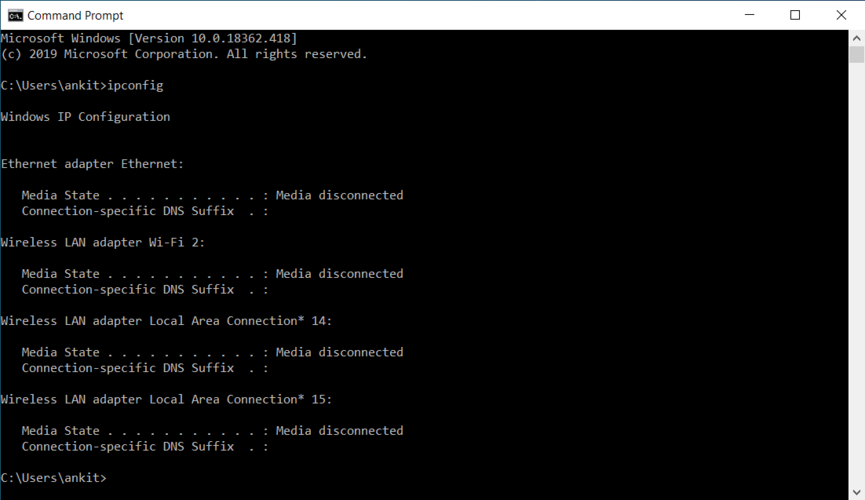
It has to be taken under consideration that ipconfig command displays both the enabled as well as the disabled configurations of networking devices that are currently connected to the system. In the below screenshot, you can see the working of ipconfig command on a Microsoft Windows PC.
In other words, we can say that it is a command-line tool that can be used to view, configure, and control the network connections in a computer.
Some of the most common ipconfig commands are:
- ipconfig/all: It gives the full configuration of the system.
- ipconfig/registerdns: This command refreshes all DHCP leases and reregisters the DNS names.
- ipconfig/displaydns: It displays the information that is stored in the DNS Resolver cache. It has all the DNS information that has been used earlier.
- ipconfig/showclassid adapter: It displays all the class id’s that are allowed for the adapter.
- ipconfig/setclassid adapter [classid]: This command is used to modify the DHCP class id.
We can also get a new IP address using the following ipconfig commands:
- ipconfig/release: This command is used to notify the server about releasing the IP address and also making it available for others to take it.
- ipconfig/renew: This command is used to request a new IP address.
- ipconfig/flushdns: This command is used to clear the DNS Resolver cache containing previous DNS information.
ifconfig
ifconfig stands for Interface Configuration. This command is the same as ipconfig, and is used to view all the current TCP/IP network configurations values of the computer. The ifconfig command is mainly used in a Unix-like operating system. The ifconfig command displays only the enabled configurations of networking devices that are currently connected to the system. In the below screenshot, you can see the working of ifconfig command on an Ubuntu PC.
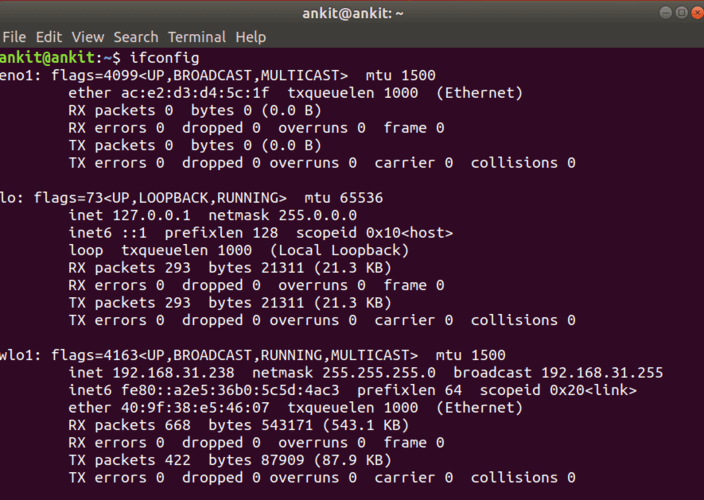
It displays information like the IP address, subnet mask, and default gateway for all adapters. It is to be noticed that ifconfig can only assign a static IP address to a networking device connected to the system. For assigning the dynamic IP address, the ‘dhclient’ command is used.
Some of the most common ifconfig commands are:
- ifconfig [interface name]: This command gives information about the network configuration of the specified interface only.
- ifconfig –a: This command gives the network configuration information about all the connected interfaces, whether they are active or not.
In other words, the ifconfig command is used for configuring, controlling, and querying TCP/IP network configurations. It can be used to change the Mac address of an interface. For this, the network interface is first disabled(set down), and then we give the command for changing the mac address. We can use the command ‘sudo ifconfig [interface name] up/down’ for enabling or disabling the network interface.
Following are the differences between ipconfig and ifconfig:
- Stands for: ipconfig stands for Internet Protocol Configuration, while ifconfig stands for Interface Configuration.
- Introduction: ipconfig can be used in a console application that displays all the network configurations of the currently connected network devices and can modify their DHCP and DNS settings. Ifconfig is a system administrator utility that is used to configure, control, and query the TCP/IP network configurations of the system.
- Supported OS: The ipconfig command is supported by the Microsoft Windows operating system, React OS, and Apple Mac OS. Some of the latest versions of the Linux OS also supports ipconfig. The ifconfig command is supported by Unix-based operating systems.
- Functionality: The ipconfig command displays all the currently connected network interfaces whether they are active or not. On the other hand, the ifconfig command displays only the enabled network interfaces that are connected to the system.
- Displaying all Interfaces configuration: The ‘ipconfig/all’ command is used to display all the network configurations of the system in Microsoft Windows OS, while the ‘ifconfig -a’ command is used for the same in a Unix-based OS.
This is all about the ipconfig and ifconfig, its application, and differences. Hope you learned something new today. That's it for this blog.
Do share this blog with your friends to spread the knowledge. Visit our YouTube channel for more content. You can read more blogs from here.
Keep Learning 🙂
Team AfterAcademy!
Written by AfterAcademy Tech
Share this article and spread the knowledge
Read Similar Articles
AfterAcademy Tech
What is the difference between SQL and MySQL?
In this blog, we will learn the difference between SQL and MySQL. People use these terms intechangeably. But both are having different meanings.

AfterAcademy Tech
What is the difference between DBMS and RDBMS?
In this blog, we will learn what is RDBMS and how it is different from DBMS. People often use these words intechangeably. But there is a difference between these two terms. So, let's learn how.
AfterAcademy Tech
What is the difference between HAVING and WHERE clause?
In this blog, we will learn how WHERE and HAVING clause are used and then see what are the main differences between the WHERE clause and HAVING clause.

AfterAcademy Tech
Difference between Mutex and Semaphore in Operating System
In this blog, we will learn about the difference between Mutex and Semaphore in the Operating System. We will first learn about Mutex and Semaphore and after that, we will find the difference between them.