Authentication vs Authorization

AfterAcademy Tech
•
12 Apr 2020
If you’re into application development, Authentication and Authorization are two terms that you might have heard often. These two are often used interchangeably which leads to confusion. Well, no more! Let’s clear up this confusion between these two once and for all.
So, what is the difference between the two?
Let’s try to understand this by an example. One of the best ways of learning new concepts is relating them with day-to-day incidents of your life. How about a simple scenario of you going to your office or your institution? You’re an employee/student there.
- You enter the gate. You show the guard your ID card and are allowed to enter the building. At this point, you are
authenticatedto enter the building. Anyone with an ID card of that office/institute is thereby authenticated to enter the building. Similar to this, applications use authentication by allowing users to login. - Now that the guard allows you in, you decide that today should be a holiday and ask the guard to close the gates and go home. Crazy, right? The guard would ask you if you’re even
authorizedto do this? Only the head/dean is allowed to make such a decision, not an ordinary employee/student like you. Similarly, whenever you perform an operation in an application, it is first checked if you have the right permissions to perform that task.
If you’d maybe gone to the canteen, you’d be allowed to do so because you are authorized to eat at the canteen.
Now that we have a grasp on the basic concept and difference between the two, let’s dive deeper.
What is Authentication?
It is basically the process of the system verifying that you are who you say you are. It is most commonly done using a username-password combination but there are other ways of authentication such as card-based or biometric scanning. It is basically any way of verifying your identity. It can be as simple as a pin or a pattern, like the one you use to unlock your phone.
But there may be multiple factors of authentication. What are factors of authentication though?
Well, did it ever happen to you that you logged into Gmail or any other service using a username-password combination and it asked you for an OTP sent to your mobile number? This method used two factors of authentication to verify you. First, it asked you for your credentials and then to verify it's really you and not someone who somehow stole your credentials, it sent an OTP to your mobile number and asked you to enter it.
Factors of authentication are basically factors that can be used to verify your identity. This factors can broadly be categorized into three categories:-
- Something the user knows: credentials, security question, pin
- Something the user has: Card, OTP on Phone, Google Authenticator
- Something the user is: Biometrics(Fingerprint, Retina, Voice), Signature
Note: A not-so-common factor is Somewhere the user is where the geolocation or IP Address is also used in the Authentication process.
Therefore, as the factors of authentication increase, the security level also increases. There are typically three levels to categorize this:-
- Single-Factor Authentication: Single-Factor authentication is the simplest among all that uses just one level of authentication, i.e. only your credentials or only a pin. This is most commonly used for simple systems without much need for security.
- Two-Factor Authentication: This combines two parameters to verify your identity. The most common example of two-factor authentication is a combination of your credentials and OTP received on your phone. Another common example is when you use your ATM card. First, to use the ATM machine, you insert your card and then you also need to enter the ATM pin in order to withdraw money. So two parameters were used: Card and pin.
- Multi-Factor Authentication(MFA): This is the most advanced form of authentication which implements multiple levels of security. This is most commonly used in banking services due to the need for high security. For example, MFA may use user credentials, ID card, and OTP on phone to verify identity.
What is Authorization?
Authentication verified who you are. Now it’s time to determine what you are allowed to do, this is the process of authorization. In other words, Authorization deals with determining the set of permissions that you are given.
Authorization is done only after a successful authentication.
Authorization is typically done by assigning roles to users. The roles have a specific set of permissions defining the access levels of the user.
For example, let’s again take an office scenario. Assume you’re a software developer, so you’re assigned the role of software developer and the role has your set of permissions defined. There might be other roles such as Team Lead, Manager, CEO each with different access levels and set of permissions. Meaning that where you might not be able to access certain files in the system with your role, your manager might be able to access it with his role because he is authorized, it's in his set of permissions to be allowed to access that file.
What is OAuth and what has it got to do with Authentication and Authorization?
OAuth is an industry-standard protocol for authorization. It is quite common and you must have seen it. The protocol has since been updated to OAuth 2.0 and is supported by most media networks.
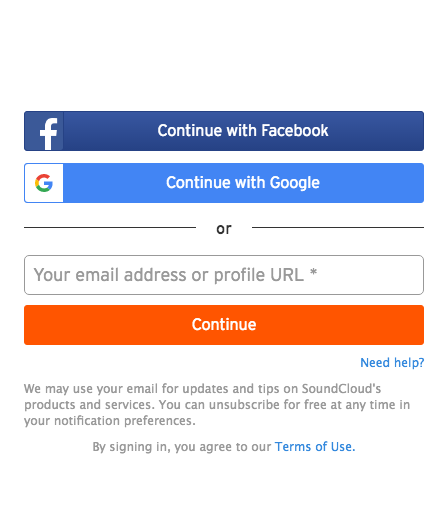
As you can see in the image, the website allows you to login using your Google or Facebook account. This is convenient for the user too as the user won’t need separate credentials for each application.
But wait… since we are asking the user to login using Facebook/Google, how is this authorization and not authentication?
Well, let’s say you created an application test_app. Now you used OAuth 2.0 in your app and allowed signing up using Facebook or Google. As soon as a new user uses the Sign up with Google option, he/she shall be directed to a dialog or popup asking them to allow the third-party application(test_app) access to his/her personal information.

This is the user authorizing your test_app to access information from Google about you. Therefore, this is an authorization protocol. It is also used for authentication as it does verify your identity.
As stated above, authentication deals with your identity(you are who you say you are). That is taken care of by Google too in the above scenario as you are typically asked to log in at Google to allow access to third-party applications. This way, developers are able to easily implement strong authentication on their platform.
Conclusion
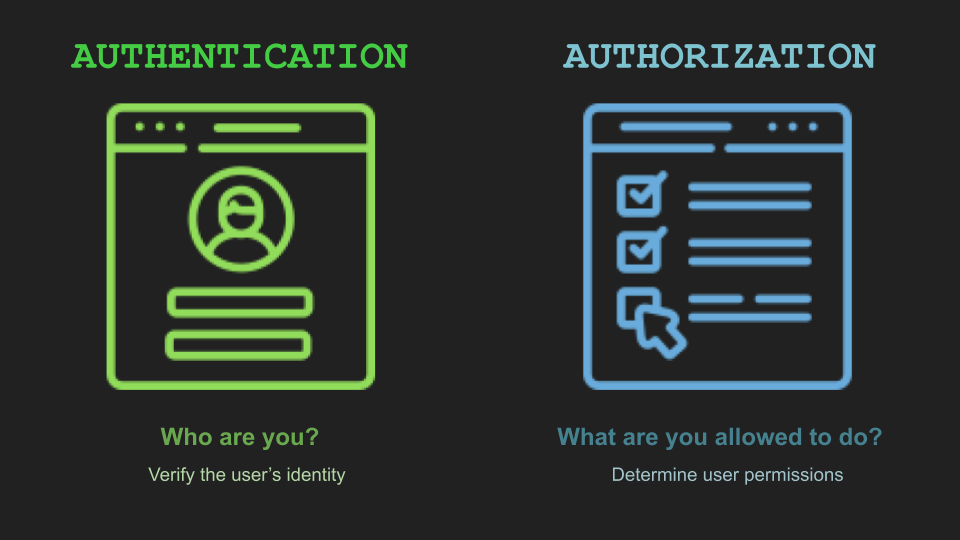
Authentication is "Who are you?"
Authorization is "What are you allowed to do?"
Access to a system is protected by both authentication and authorization. Only upon successful authentication and authorization is access to any resource allowed. Firstly, the user is authenticated to verify the user's identity and upon successful authentication, it is checked if the user is authorized to access/update the resource. Even if the authentication succeeds, if authorization fails, the user won't be allowed to access/update the resource.
Let me know your feedback in the comments below.
Happy Learning!
Please, share this blog so that others can learn from it.
Written by AfterAcademy Tech
Share this article and spread the knowledge
Read Similar Articles
AfterAcademy Tech
Multiprogramming vs Multiprocessing vs Multitasking
In this blog, we will learn the difference between Multiprogramming, Multiprocessing, and Multitasking. These terms come into play when we talk about our processes and the processors. Let's see the difference between these.


Janishar Ali
Implement JSON Web Token (JWT) Authentication using AccessToken and RefreshToken
Implement JSON Web Token (JWT) Authentication using AccessToken and RefreshToken In this blog, we will learn about the concepts of JsonWebToken (JWT) based authentication in Node.js. We will also cover all the edge cases of the security involved in token handling.
AfterAcademy Tech
Deno vs Node
Deno is this new thing everyone is hyped about. Many say Node is redundant now. Is it? Well, No. But read this blog to find out more!
AfterAcademy Tech
NPM vs Yarn
npm and Yarn are two very popular and highly used package managers and we discuss on the comparisons between the two in this blog