
What is View in SQL?

AfterAcademy Tech
•
03 Mar 2020
SQL provides us with the VIEW statements which helps the users to structure the data in a way that they find more relevant to their needs. Suppose your professor wants that each student sees only their marks and not the marks of their classmates. So, your professor will create a view such that each student sees only their result. In this blog, we will learn how views are created, updated and dropped if required. So, let's get started.
View
Views in SQL are the virtual tables that do not really exist like the tables of the database. These Views are created by SQL statements that join one or more tables. The views contain rows and columns. We can CREATE VIEW by selecting the fields from one or more tables of the database. We can also Update and Drop the views according to our requirements.
Create SQL View
We can create View using the CREATE VIEW statement. A View can be created using a single table or multiple tables.
The basic Syntax for creating VIEW:
CREATE VIEW view_name AS
SELECT column1, column2, column3...
FROM table_name
WHERE [condition];
Here, view_name is the name of the VIEW you want to create. Also, WHERE conditions are optional. These conditions must be met for the records to be included in the VIEW.
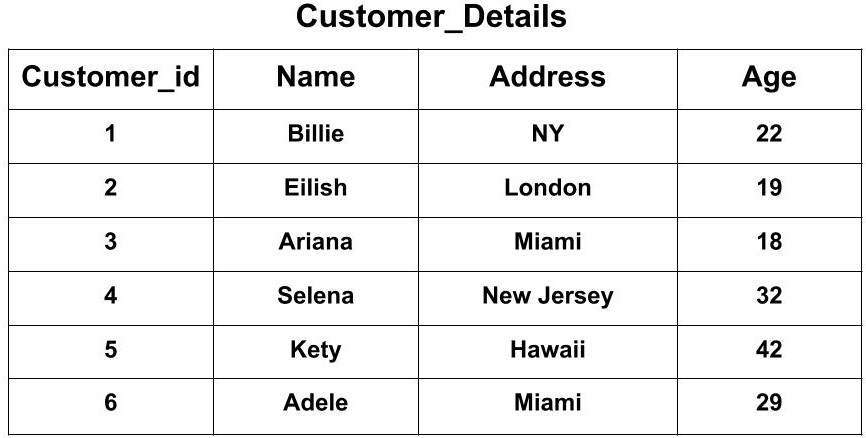
Examples: Suppose we have two tables. First, the Customer_Details Table which has attributes as Customer_id, Name, Address, Age.
Second, the Customer_Order Table which has attributes as Customer_id, Name, Product, Date.

- Creating a view from a single Table:
Query
CREATE VIEW Customer_view AS
SELECT Customer_id, Name, Address
FROM  Customer_Details
WHERE Address = "Miami";
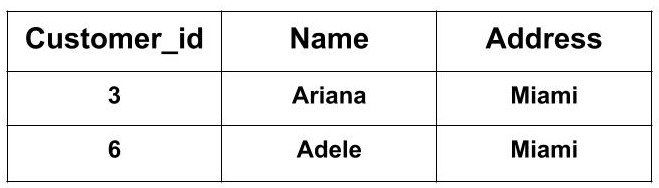
The above CREATE VIEW statement would create a virtual table based on the result of the SELECT statement. Now, you can query the SQL VIEW as follows to see the output:
SELECT * FROM Customer_view;
In reality, there is no table named Customer_view. It's just a view that we are using.
Output
- Creating View from Multiple Tables
Query
CREATE VIEW Order_view AS
SELECT Customer_Details.Name, Customer_Details.Address, Customer_Order.Product
FROM Customer_Details, Customer_Order
WHERE Customer_Details.Name = Customer_Order.Name;
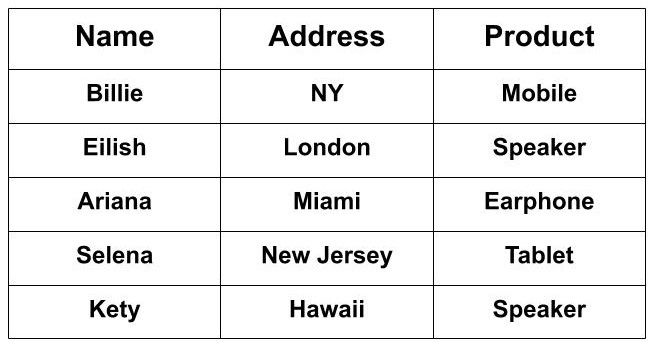
The above CREATE VIEW statement would create a virtual table based on the result of the SELECT statement. Now, you can query the SQL VIEW as follows to see the output:
SELECT * FROM Order_view;
Output
Update SQL View
The SQL view created can also be modified. We can do the following operations with the SQL VIEW.
But, all views are not updatable. A SQL view can be updated if the following conditions are satisfied.
- The view is defined based on only one table.
- The view should not have any field which is made of an aggregate function.
- The view must not have GROUP BY, HAVING or DISTINCT clause in its definition.
- The view should not be created using any nested query.
- The selected output fields of the view must not use constants, string or value expressions.
- If you want to update a view based on another view then that view should be updatable.
Updating a SQL View
We can use the CREATE OR REPLACE VIEW statement to modify the SQL view.
Syntax
CREATE OR REPLACE VIEW view_name AS
SELECT column1,coulmn2,..
FROM table_name
WHERE condition;
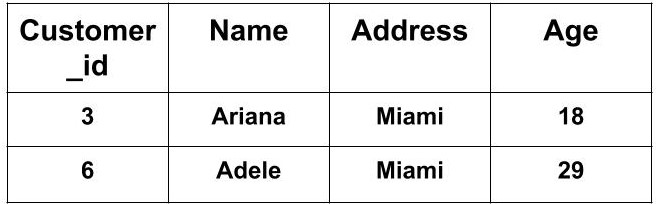
Example: If we want to update the view Customer_view and add the attribute "Age" from in the view then the query would be:
Query
CREATE OR REPLACE VIEW Customer_view AS
SELECT Customer_id, Name, Address, Age
FROM  Customer_Details
WHERE Address = "Miami";
The above CREATE OR REPLACE VIEW statement would create a virtual table based on the result of the SELECT statement. Now, you can query the SQL VIEW as follows to see the output:
SELECT * FROM Customer_view;
Output
Drop SQL View
A created view can be deleted using the DROP VIEW statement. This is required if we no longer need any created view.
Syntax
DROP VIEW view_name;
Here, view_name is the name of the VIEW that you want to drop.
Example: If you want to drop the created view Customer_view created in the above example, then the query will be:
Query
DROP VIEW Customer_view;
This is all about Views in SQL. Hope you learned something new today.
Do share this blog with your friends to spread the knowledge. Visit our YouTube channel for more content. You can read more blogs from here.
Keep Learning 🙂
Team AfterAcademy!
Written by AfterAcademy Tech
Share this article and spread the knowledge
Read Similar Articles
AfterAcademy Tech
What is the difference between SQL and SQL server?
In this blog, we will learn about the various differences between SQL and SQL server based on some points.
AfterAcademy Tech
What is SQL?
In this blog, we will learn about SQL. We will see the definition of SQL and various processes that are involved in the query processing of some SQL query.

AfterAcademy Tech
What is an embedded and dynamic SQL?
In this blog, we will learn the difference between the embedded and dynamic SQL in deatail. We will also see which SQL statement to use when?

AfterAcademy Tech
What is the difference between SQL and NoSQL?
In this blog, we will learn the difference between SQL and NoSQL databases.
