What is ARP and how does it work?

AfterAcademy Tech
•
07 Feb 2020

Suppose you want to access any website like google.com. The browser behind the scene will use the application layer services such as HTTP for establishing the connection between two systems. Now, the HTTP will get help from the transport layer including TCP (Transmission Control Protocol) and add the information like Port number and the details regarding transport layer protocol. Now, the network layer will add IP information. Network Layer will add the source IP address and the destination IP address. How will the source computer know about the destination IP address? The DNS will resolve the URL or name to the IP address. Now, this data packet is handed down to layer 2 i.e. data link layer. In layer 2, the communication happens mostly over the MAC address or physical address(MAC address is the permanent physical address of the computer). So how in the world would the source computer know the destination IP address or the MAC address associated with it? This is where ARP comes into the picture. ARP helps in knowing the MAC address of the destination given the IP address. So, let's dive deep into ARP and start the blog.
ARP
Address Resolution Protocol is one of the most important protocols of the network layer in the OSI model which helps in finding the MAC(Media Access Control) address given the IP address of the system i.e. the main duty of the ARP is to convert the 32-bit IP address(for IPv4) to 48-bit address i.e. the MAC address.
How does ARP work?
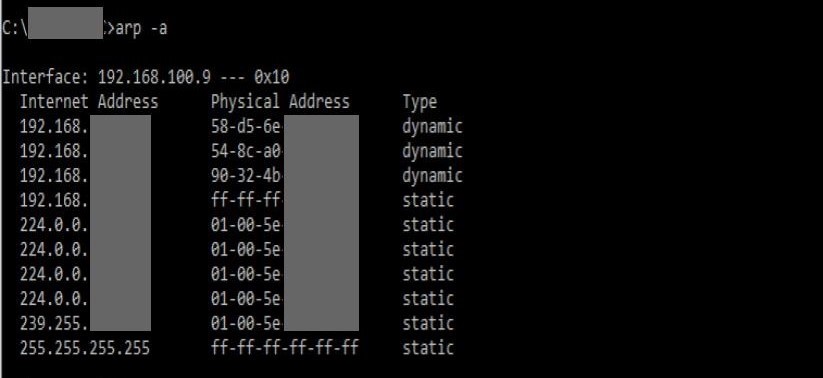
- At the network layer when the source wants to find out the MAC address of the destination device it first looks for the MAC address(Physical Address) in the ARP cache or ARP table. If present there then it will use the MAC address from there for communication. If you want to view your ARP cache(in Windows Operating System) then open Command Prompt and type command —‘arp -a’ (without quotes). An ARP table looks something like this.
- If the MAC address is not present in the ARP table then the source device will generate an ARP Request message. In the request message the source puts its own MAC address, its IP address, destination IP address and the destination MAC address is left blank since the source is trying to find this.
Sender's MAC Address	00-11-0a-78-45-AD
Sender's IP Address	192.16.10.104


Target's MAC Address	00-00-00-00-00-00
Target's IP Address	192.16.20.204
- The source device will broadcast the ARP request message to the local network.
- The broadcast message is received by all the other devices in the LAN network. Now each device will compare the IP address of the destination with its own IP address. If the IP address of destination matches with the device's IP address then the device will send an ARP Reply message. If the IP addresses do not match then the device will simply drop the packet.
- The device whose IP address has matched with the destination IP address in the packet will reply and send the ARP Reply message. This ARP Reply message contains the MAC address of this device. The destination device updates its ARP table and stores the MAC address of the source as it will need to contact the source soon. Now, the source becomes destination(target) for this device and the ARP Reply message is sent.
Sender's MAC Address	00-11-0a-78-45-AA
Sender's IP Address	192.16.20.204

Target's MAC Address	00-11-0a-78-45-AD
Target's IP Address	192.16.10.104
- The ARP reply message is unicast and it is not broadcasted because the source which is sending the ARP reply to the destination knows the MAC address of the source device.
- When the source receives the ARP reply it comes to know about the destination MAC address and it also updates its ARP cache. Now the packets can be sent as the source nows destination MAC address.
Sample Example
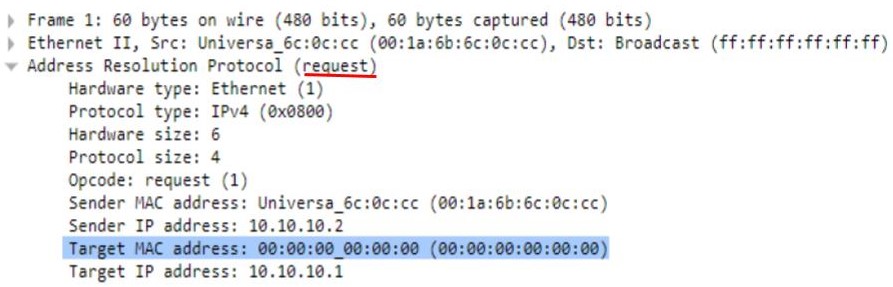
The ARP Request and Reply messages can be captured. The sample example below is the example of an ARP Request Message which is captured. You can see that the destination MAC address is blank i.e. 00:00:00:00:00:00.
The request message contains various other fields like
- Hardware type- It specifies the type of hardware used while transmitting the ARP message. Mostly the hardware type is Ethernet.
- Protocol type- a number is assigned to each protocol and here IPv4 is used. IPv4 is 2048 (0x0800 in Hexa).
- Protocol size- length of IPv4 address(here 4 bytes).
- Opcode-it specifies the nature of the ARP message. 1 for ARP request and 2 for ARP reply,
- Source IP Address- here 10.10.10.2
- Destination(Target) IP Address- here 10.10.10.1
- Source MAC Address -here 00:1a:6b:6c:0c:cc
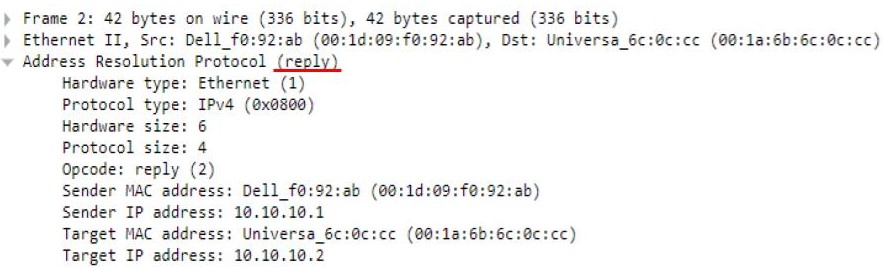
A sample example of ARP Reply message captured. The reply message contains the MAC address which was asked by the source. The MAC address 00:1d:09:f0:92:ab is sent in the ARP Reply message.
Advantages of using ARP
- MAC addresses can easily be known if we know the IP address.
- End nodes do not need to be configured to “know” MAC addresses. They can be found when required.
Disadvantages of using ARP
- There may be ARP attacks like ARP spoofing and ARP Denial of Services. ARP Spoofing is a technique that allows an attacker to attack an Ethernet Network which may lead to sniffing of data frames on switched Local Area Network or to the attacker may stop the traffic altogether which is also known as ARP denial of Services.
This is all about ARP and its working. Hope you learned something new today.
Do share this blog with your friends to spread the knowledge. Visit our YouTube channel for more content. You can read more blogs from here.
Keep Learning 🙂
Team AfterAcademy!!
Written by AfterAcademy Tech
Share this article and spread the knowledge
Read Similar Articles
AfterAcademy Tech
What is FTP and how does an FTP work?
In this blog, we will learn what is an FTP protocol, how does it works, what are various modes in which it works, what are the advantages and disadvantages of using it.

AfterAcademy Tech
What is the OSI model and how it works?
In this blog, we will mainly learn about the OSI model and its working in detail. We'll focus on the features and working of each layer of the OSI model.

AfterAcademy Tech
What is DHCP and how does it work?
In this blog, we will learn what is DHCP, what are various entities related to DHCP and how does it work. We will also discuss how IP configurations are dynamically done.

AfterAcademy Tech
What is the TCP/IP model and how it works?
In this blog, we will mainly learn about the TCP/IP model and its working in detail. We'll focus on the features and working of each layer of the TCP/IP model.