What are Super key, Primary key, Candidate key, and Foreign keys?

AfterAcademy Tech
•
05 Jan 2020

We have tables in our database so that whenever we need any data we can retrieve it easily. A table is made up of rows and columns. When we need the data of any column then we can directly access it by the name of the column i.e attribute. But if we have to retrieve the data of any particular row then how do we do that? We have the name of every column so we can easily select any column but rows don't have any specific name. So, how can we select any specific row? To do this we must know any property or hint according to which we can easily select any specific row from many rows. If we are able to do this then we can say that we can access the table and the hint which will help us in doing so is the key. In this blog, we will learn about various types of keys that are used in DBMS. So, let's get started.
Key
A key is an attribute or set of attributes which helps us in uniquely identifying the rows of a table. It also helps in establishing relationship among tables. We will now see how this is done with the help of examples.
Example: If we have the details of students of a classroom stored in Student table as follows:
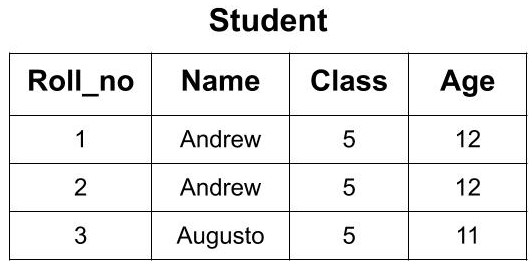
Now, from this classroom, if we want to call a student whose name is ‘Andrew’ we don't know which ‘Andrew’ to call as there are two students with the same name. Also, we if know the age of student ‘Andrew’ we can’t distinguish between both the students because both are having the same age. So, there must some value through which we can distinguish and uniquely identify the students. The ‘Roll_no’ attribute will help us in uniquely identifying the rows in a table. We can say that ‘Roll_no’ is the key here. Now, if we know the ‘Roll_no’ of the student then there will be no confusion and we can easily select the student from here.
Key can be of the following types:
- Super Key
- Candidate Key
- Primary Key
- Alternate Key
- Foreign Key
Super Key
A super key or simply key is a combination of all possible attribute which can uniquely identify the rows(tuples) in a table. This means that a superkey may have some extra attribute which isn't necessary for uniquely identifying the rows in the table.
Example: In the given Student Table we can have the following keys as the super key.
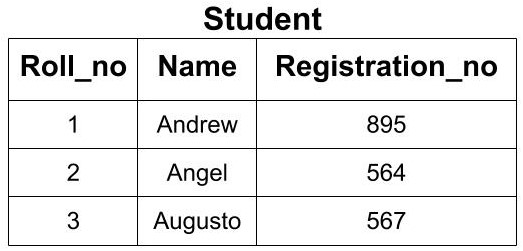
- {Roll_no}
- {Registration_no}
- {Roll_no, Registration_no},
- {Roll_no, Name}
- {Name, Registration_no}
- {Roll_no, Name, Registration_no}
All the above keys are able to uniquely identify each row. So, each of these keys is super key. Here you can see that by using Roll_no only, we can uniquely identify the rows but if you are making a super key, then you will try to find all the possible cases of keys that can be used to identify data uniquely.
Candidate Key
A candidate key is a minimal super key or a super key with no redundant attribute. It is called a minimal superkey because we select a candidate key from a set of super key such that selected candidate key is the minimum attribute required to uniquely identify the table. It is selected from the set of the super key which means that all candidate keys are super key. Candidate Keys are not allowed to have NULL values.
If the subset of the candidate key is a super key, then that candidate key is not a valid candidate key.
Example: In the above example, we had 6 super keys but all of them cannot become a candidate key. Only those super keys would become a candidate key which have no redundant attributes.
- {Roll_no}: This key doesn't have any redundant or repeating attribute. So, it can be considered as a candidate key.
- {Registration_no}: This key also doesn't have any repeating attribute. So, it can be considered as a candidate key.
- {Roll_no, Registration_no}: This key cannot be considered as a candidate key because when we take the subset of this key we get two attributes i.e Roll_no or Registration_no. Each of these attributes is the candidate key. So, it is not a minimal super key. Hence, this key is not a candidate key.
- {Roll_no, Name}: This key cannot be considered as a candidate key because when we take the subset of this key we get two attributes i.e. Roll_no or Name. Roll_no is a candidate key. So, it is not a minimal super key. Hence, this key is not a candidate key.
- {Name, Registration_no}: This key cannot be considered as a candidate key because when we take the subset of this key we get two attributes i.e Registration_no or Name. Registration_no is a candidate key. So, it is not a minimal super key. Hence, this key is not a candidate key.
- {Roll_no, Name, Registration_no}: This key cannot be considered as a candidate key because when we take the subset of this key we get three attributes i.e Roll_no, Registration_no and Name. Two of these attributes i.e Roll_no and Registration_no are the candidate key. So, it is not a minimal superkey. Hence, this key is not a candidate key.
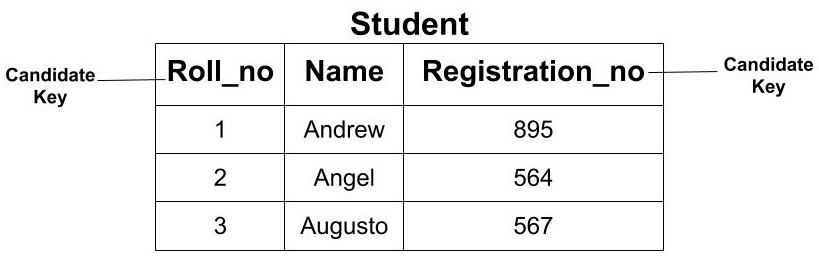
So, from the above discussion, we conclude that we can have only 2 out of above 6 super keys as the candidate key. i.e. (Roll_no) and(Registration_no).
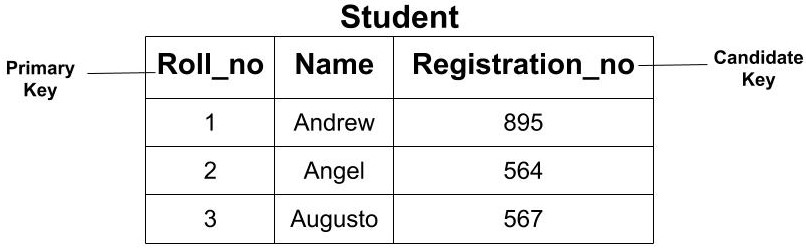
Primary Key
The primary key is the minimal set of attributes which uniquely identifies any row of a table. It is selected from a set of candidate keys. Any candidate key can become a primary key. It depends upon the requirements and is done by the Database Administrator (DBA). The primary key cannot have a NULL value. It cannot have a duplicate value.
Example: In the above example, we saw that we have two candidate keys i.e (Roll_no) and (Registration_no). From this set, we can select any key as the primary key for our table. It depends upon our requirement. Here, if we are talking about class then selecting ‘Roll_no’ as the primary key is more logical instead of ‘Registrartion_no’.
Alternate Key
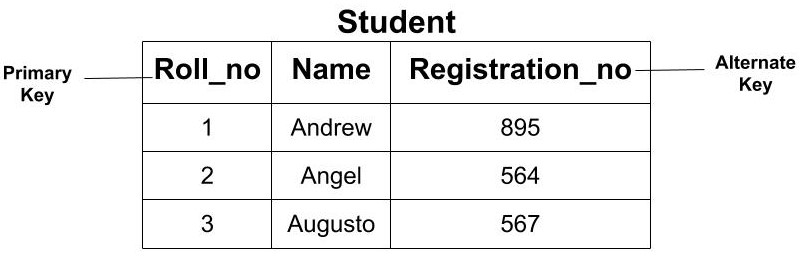
All the candidate key which are not a primary key are called an alternate key.
Example: In the above example, since we have made ‘Roll_no’ as the Primary Key our Alternate Key would be ‘Registration_no’.
Foreign Key
The foreign key of a table is the attribute which establishes the relationship among tables. The foreign key is the attribute which points to the primary key of another table.
Example: If we have two tables of Student and Course then we can establish a relationship between these two tables using a foreign key. The ‘Course_id’ in the Student table is the foreign key as it establishes the link between the Student and Course Table. So, if we need to find the information about any course opted by any student then we can go the Course table using the foreign key.
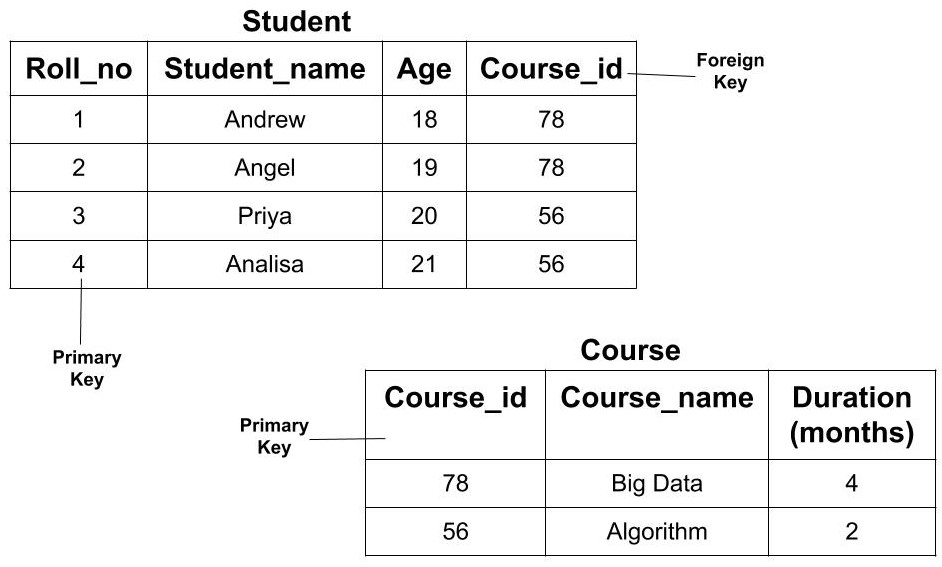
One thing that is to be noted here is that the foreign key of one table may or may not be the primary key. But it should be the primary key of another table. In the above example, Course_id is not a primary key in the Student table but it is a primary key in the Course table.
This is all various types of keys in DBMS. Hope you learned something new today.
Do share this blog with your friends to spread the knowledge. Visit our YouTube channel for more content. You can read more blogs from here.
Keep Learning 🙂
Team AfterAcademy!
Written by AfterAcademy Tech
Share this article and spread the knowledge
Read Similar Articles
AfterAcademy Tech
What is the difference between Primary key and Unique key?
In this blog, we will learn what are unique keys and what is the need for unique keys. We will also discuss various points on which the unique key differ from a primary key.
AfterAcademy Tech
What are Protocols and what are the key elements of protocols?
In this blog, we will learn about Protocols. We will also learn about the types, key elements, and functionalities of protocols used in computer network and data communication.

AfterAcademy Tech
What are the various types of constraints in SQL?
In this blog, we will learn various types of constraints that can be applied on a table. These constraints can be used to validate the data present in the table. We will learn about NOT NULL, UNIQUE, PRIMARY KEY, FOREIGN KEY, CHECK, and DEFAULT
AfterAcademy Tech
How to traverse in a tree?
It is important to know traversal techniques in a tree before solving tree problems. We have discussed the 3 primary traversals in a tree at length in this blog with both recursive and iterative implementations.